Here is something an app company is not supposed to say: sometimes the best thing for a child is to put the screen down.
Ask a parent of a nine-year-old. By six in the evening that child has had a full day of screens, some of them at school. "Now go and do your homework on the tablet" is, understandably, not always welcome. And there are things paper is simply better at. Drawing a line between two ideas. Circling a word. Colouring in a star. Being stuck on the fridge.
So we built Print Studio. Its heading is three words long and we are rather proud of them: Paper that teaches.
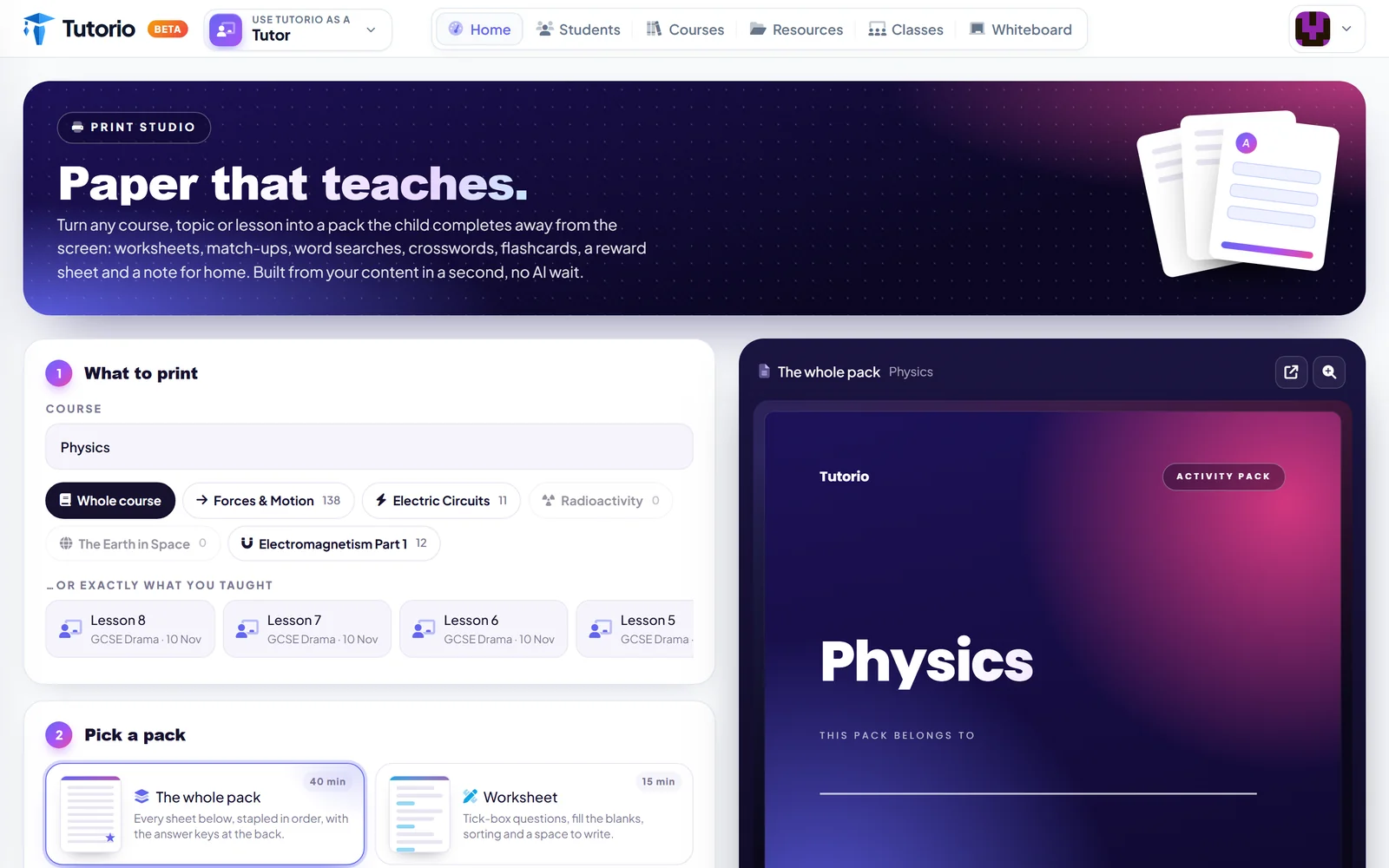
Step 1: what to print
Pick a course. Then go as broad or as narrow as you like: the whole course, a single topic, or one lesson.
Just underneath is our favourite line on the page: or exactly what you taught. Your recent lessons are listed, so you can print a pack for the session you delivered on Monday, and nothing a child has not met yet.
Step 2: pick a pack
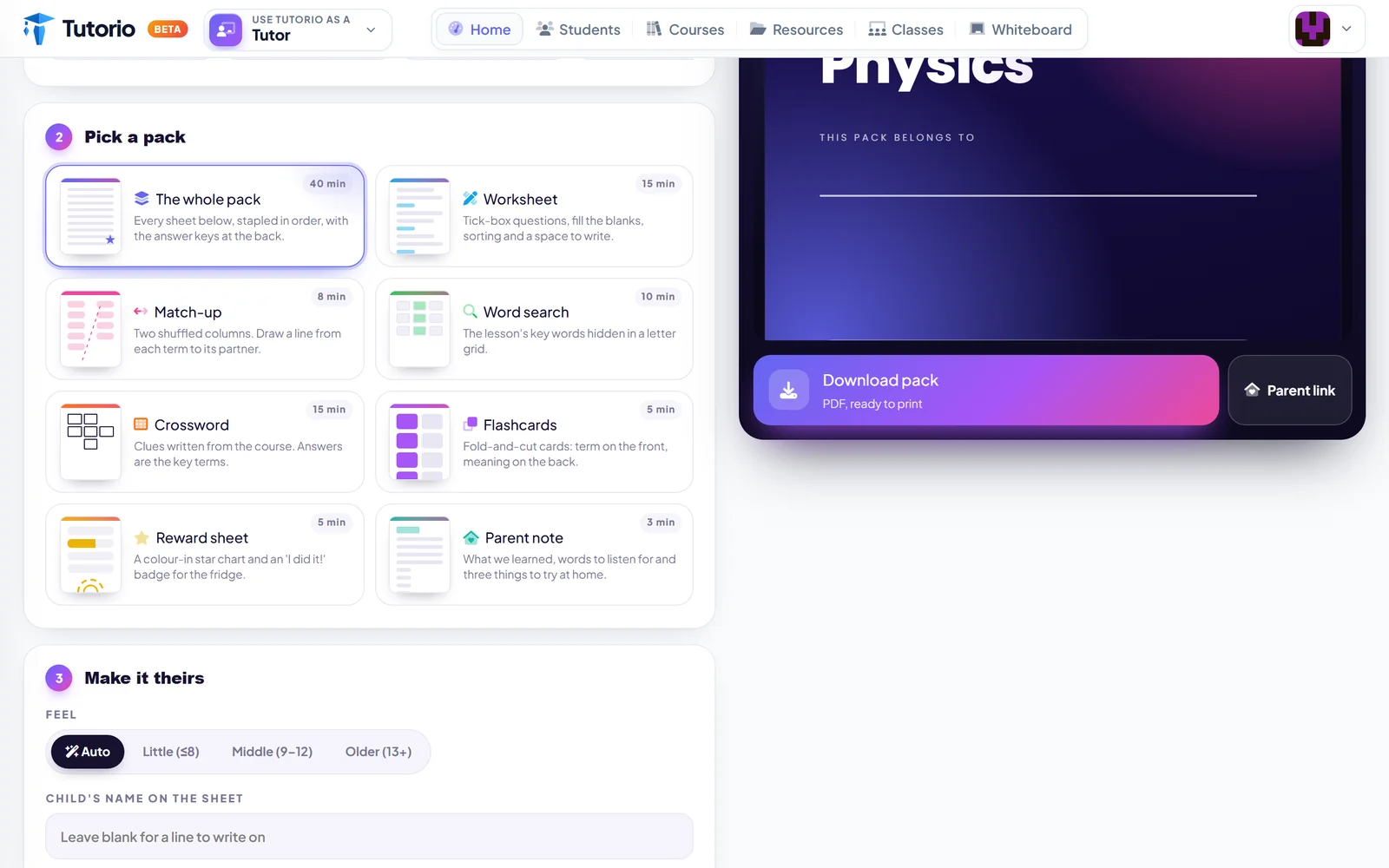
There are eight things on the menu:
- Worksheet. Tick-box questions, fill the blanks, sorting, and a space to write.
- Match-up. Two shuffled columns. Draw a line from each term to its partner.
- Word search. The lesson's key words, hidden in a grid.
- Crossword. Clues written from the course itself.
- Flashcards. Fold and cut. Term on the front, meaning on the back.
- Reward sheet. A colour-in star chart and an "I did it!" badge for the fridge.
- Parent note. What we learned, words to listen out for, and three things to try at home.
- The whole pack. All of the above, stapled in order, with the answer keys at the back.
Every one of them is made from your own course. The crossword clues come from your lessons. The word search hides your key words. This is not a generic activity book with your subject's name on the front.
The answer keys are at the back. We were once children too, and we know exactly where they would look first.
The one for the fridge
Two of those deserve a second look, because they are not really for the child.
The reward sheet is for the kitchen. A star chart a child colours in themselves, and a badge that says "I did it!" Small children do not care about mastery percentages. They care enormously about a star they coloured in being on the fridge where Grandma can see it.
The parent note is for the adult who wants to help and has no idea how. It tells them what was covered, gives them a few words to listen out for, and suggests three things to try at home. That is a parent armed with something better than "did you do your homework?", which is a question worth retiring anyway.
Step 3: make it theirs
Last, you choose a feel: Little (6 to 8), Middle (9 to 12), Older (13 and up), or let it decide. A worksheet for a seven-year-old and one for a fourteen-year-old should not look alike, and now they do not.
Then you can put the child's name on the sheet. It is a small touch. It is also the difference between a handout and something that was made for you.
And it is instant
One line on the page matters more than it looks: built from your content in a second, no AI wait.
Print Studio is not generating anything new. It rearranges the lessons you already have into something that fits on paper. So there is no spinner and no queue. Press Download pack and you have a PDF, ready to print, while the kettle is still boiling. There is a Parent link button as well, for families who would rather print it at home.
Why an app would tell you to print
Because we do not think the point is the app. The point is that a child learns the thing. Some of that happens on a phone on the bus. Some of it happens with a pencil at the kitchen table while somebody makes tea.
If the second kind suits your student better this week, we would rather help you do it well than pretend it does not exist.
Questions people ask
What can I print from a lesson?
A worksheet, a match-up, a word search, a crossword, flashcards, a reward sheet and a parent note, or the whole pack in order with the answer keys at the back.
Are the worksheets generic?
No. Every sheet is made from your own course. The crossword clues come from your lessons, and the word search hides your key words.
How long does a pack take to make?
About a second. Print Studio rearranges the lessons you already have, so there is no AI wait and no queue.
Can I match the pack to a child's age?
Yes. Choose Little (6 to 8), Middle (9 to 12) or Older (13 and up), or let it decide. You can also put the child's name on the sheet.
Can parents print the pack at home?
Yes. The Parent link button is for families who would rather print it themselves.

Written by the Tutorio team. We build Tutorio, so these posts describe the product as it is today. Every screenshot is a real capture of the app, and anything that changes gets an updated date. Spotted something out of date? Tell us.